


OnlyDrams
4.8219.00 Reviews
App Specs
- Version
- 3.11.10
- Updated On
- License
- Free
- Downloads
- 10,000+
- Developer
- OnlyDrams
- Categories
- Food & Drink
- Platform
- Android
Screenshots
 Analysis by AppCompare
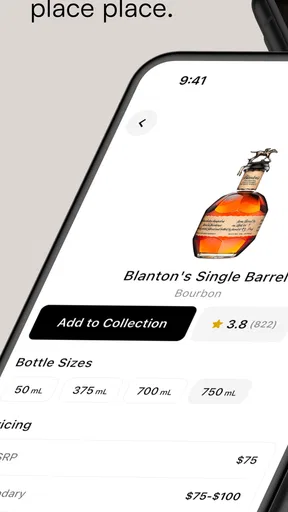
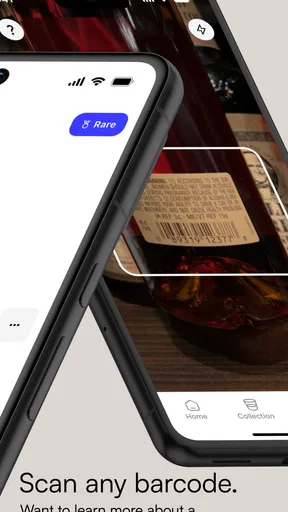
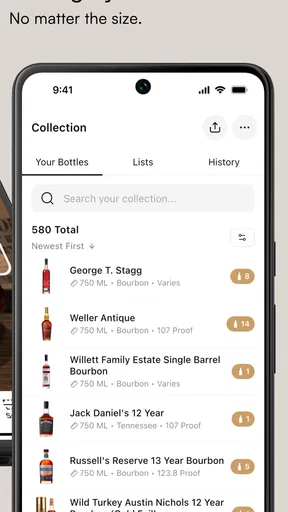
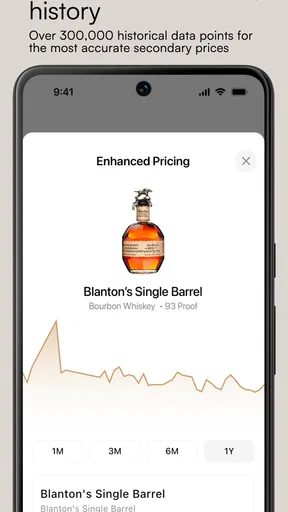
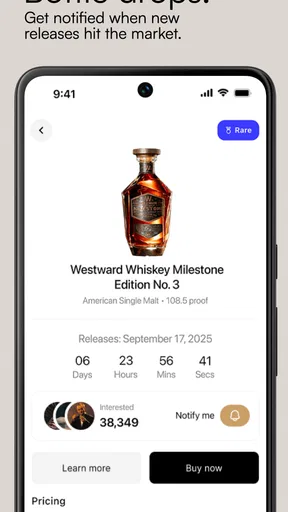
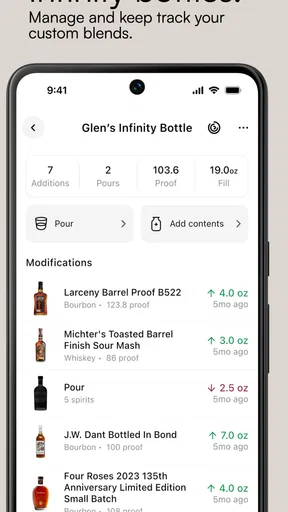
I came to OnlyDrams with a familiar problem: a spirits shelf can grow faster than my memory. Bottles bought for a special occasion, gifts waiting to be opened, half-remembered purchases, and bottles tucked behind newer arrivals quickly become difficult to track. This free Food & Drink app from OnlyDrams is designed to turn that loose collection into something I can manage from my phone, whether it is modest or already taking up serious storage space.
My first impression was that the app makes more sense when treated as a personal inventory tool rather than as another place to browse drinks. That distinction matters. If I only want cocktail recipes or general tasting inspiration, a recipe app or a drinks-focused social network may feel more immediately useful. If I want to know what I own, what I have not opened, and which bottle I should reach for next, the purpose here is much clearer.
The app is free to install, carries a Mature 17+ rating, and works on devices running Android 8.0 or later. Optional in-app purchases range from under a dollar to a much higher one-time item price, so I would approach the paid elements as extras rather than assuming every useful part is included without cost. The current version is 3.11.10, and the app has already passed ten thousand installs, with an average rating of 4.8 from roughly 2.6 thousand ratings. Those figures suggest a focused audience has found value in the idea, although they do not remove the need to decide whether its collection-first approach matches my habits.
From an untidy shelf to a usable collection
I look at the move from a cluttered shelf to a useful collection as a question of choosing what deserves to be tracked first, rather than documenting every bottle at once. A small, reliable starting inventory can already make shopping and hosting less guesswork-heavy. From there, the next section considers how that routine holds up when the collection gets larger and the app sees heavier use.
Starting with the real problem
The most useful way to begin is not by trying to catalogue every bottle perfectly. I would start with the part of the collection that causes daily confusion: unopened bottles, bottles stored in different rooms, or the group I regularly forget to check before shopping. This gives the app a practical job immediately instead of turning setup into a long administrative project.
For example, imagine I am preparing for a weekend dinner. I remember owning a bottle of rye, a bottle of sweet vermouth, and something suitable for a simple after-dinner pour, but I cannot remember where any of them are or whether I already finished one. A collection manager can replace that guesswork with a quick check before I buy another bottle. The benefit is not dramatic in a single moment; it appears through many small decisions where I avoid duplicate purchases or use something I had overlooked.
I also found that the app is better suited to people who care about their bottles as individual items. Someone with a rotating selection of inexpensive mixers may not gain much from entering everything. A collector, a host, or anyone who buys spirits faster than they drink them has a stronger reason to keep the list current.
Worth Reading Before You Choose

Flipboard Shows What News Apps Must Do Beyond the Feed

Switching to Android Auto Means Rethinking Your Driving Routine

Google Calendar Makes a Crowded Week Easier to Manage

Ludo King Makes the Most of the Minutes Between Plans

Baby Panda World Brings Quick Play to Modern Phones, but Its Game Library Feels Busy

ESPN’s Live Game View Makes Following Close Games Easier
Building the first useful inventory
I would add the collection in passes. The first pass should cover the bottles I can see and identify without research. The second can handle bottles stored elsewhere. The third is where I would correct names, categories, or personal notes after using the app for a few days. This workflow is less tiring than demanding perfect records from the first entry.
A helpful habit is to record a bottle at the moment it enters the home, not when I am already standing in front of a crowded shelf. A gift can be added before it disappears into a cabinet, and a new purchase can be checked against the existing collection while the receipt is still in my hand. That small timing change is one of the strongest practical advantages of keeping the inventory on a phone.
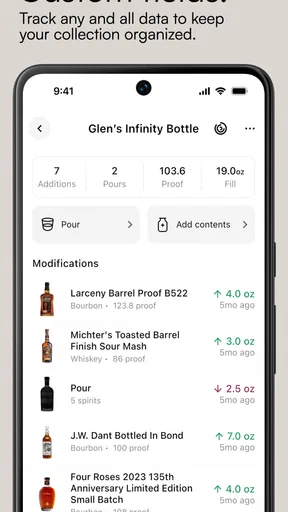
I would also avoid treating every field as equally important. The essential information is whatever helps me make a decision later: what the bottle is, where it is kept, whether it is open, and whether I want to buy it again. Extra detail is worthwhile only if I will actually use it. An over-detailed catalogue that I stop maintaining is less useful than a simple, current one.
Turning the list into a routine
Once the initial collection is entered, the app becomes more valuable when it is connected to ordinary routines. Before shopping, I can check what is already available. Before hosting, I can review likely serving options. After opening a bottle, I can update its status while the event is still fresh in my mind. When I finish something, removing or adjusting it immediately prevents the inventory from becoming fiction.
This is also where I noticed a trade-off. A collection app depends on user discipline. It cannot know that a bottle was poured at a party unless I tell it. If I share drinks frequently with friends, the handoff between the real shelf and the digital record becomes the main source of friction. The app can organize my information, but it cannot automatically protect that information from being neglected.
Using the collection before making a purchase
The most convincing use case is shopping. I can check the collection before deciding whether I need another bottle in a familiar category or whether I should choose something different. This is especially useful for people who buy based on memory, because memory tends to remember the exciting bottle and forget the three similar ones already at home.
There is a second benefit that is easy to miss: the inventory can expose imbalance. I might think I have a varied shelf, then notice that most of my choices fall into one narrow style while useful supporting bottles are missing. That can change a purchase from “another interesting bottle” to “something that completes more of what I already own.” The app is not making the decision for me; it is giving the decision a better starting point.
Handoffs between the phone, the shelf, and other people
The important handoff is between the digital record and the physical bottle. I would keep the phone nearby while organizing the shelf, then use the physical arrangement to verify what the app says. If a bottle is moved to a different cabinet, I would update its location at that moment rather than trusting myself to remember later. Location information is only useful when it reflects the latest move.
There is another handoff when someone else chooses a bottle. A partner may ask what is available, a guest may want to browse, or a friend may return a bottle to the wrong place after a gathering. In those situations, the app works best as a shared reference for conversation, but the owner still needs to perform the final update. I would not assume that showing the list automatically keeps the collection accurate.
For a household, I would establish one simple rule: whoever opens or finishes a bottle updates the record. That is more realistic than expecting one person to audit every shelf after every gathering. It also keeps the app from becoming a private notebook that quickly diverges from the household’s actual stock.
Where the workflow becomes less comfortable
The biggest weakness is the work required at the edges. A small collection can be entered quickly, but a large one may demand patience, especially when bottles have similar names or when I want consistent details for each item. The more ambitious my catalogue becomes, the more time I spend maintaining it rather than using it.
There is also a psychological trap: cataloguing can feel productive even when it does not improve my drinking or buying decisions. I would resist adding elaborate notes simply because they look satisfying. The app earns its place when it answers practical questions quickly, not when it becomes a second hobby that competes with enjoying the collection.
The Mature 17+ rating also makes the intended audience clear. This is an app for adults managing spirits, not a general family food organizer. Parents looking for a shared pantry tool, or users who want a broad meal-planning app, should choose something built around those needs instead.
What the result looks like in everyday use
After the collection is established, the outcome is a shorter path from question to answer. Instead of opening cabinets, moving boxes, and trying to remember what I bought months ago, I can consult the app first. That is the real result: fewer duplicate decisions and a clearer view of what I already own.
In my dinner-party example, the useful sequence is straightforward. I check the collection before shopping, confirm which spirits are available, choose a bottle that fits the occasion, and update the record after opening it. The app does not replace planning, tasting judgment, or hospitality. It removes one layer of avoidable uncertainty so those parts receive more attention.
For collectors, the outcome can be more reflective. A maintained inventory makes it easier to see which bottles are waiting, which ones are repeatedly chosen, and which purchases have become invisible behind newer arrivals. That may encourage me to open something I already own instead of treating every occasion as a reason to buy again.
Who should use it, and who should skip it
I would recommend OnlyDrams to someone with enough spirits that remembering them has become inconvenient. It is a particularly sensible choice for people who host, move bottles between storage areas, receive gifts, or want a quick pre-shopping check. It also suits users who enjoy keeping a personal record but do not need a full social network or a recipe library to justify an app.
I would skip it if my collection is tiny, changes constantly, or is mostly consumed immediately. In that situation, a phone note or a simple shopping list may be faster. I would also choose a different kind of app if my main goal is cocktail instruction, food pairing, drinking education, or discovering venues. Inventory management is the center of this experience, and its value drops when that is not the problem I am trying to solve.
People considering the paid items should think about their own workflow first. I would use the free experience long enough to learn whether I actually maintain the collection. Paying for additional conveniences before developing that habit could leave me with a more elaborate system that I still fail to update.
My practical verdict after following the full workflow
OnlyDrams succeeds because it focuses on a specific annoyance instead of pretending to solve every food-and-drink problem. The strongest path is simple: enter the bottles that matter, consult the collection before buying or hosting, update it when bottles move or open, and keep the record deliberately modest. That approach gives the app a useful role without turning it into a chore.
Its limitations are equally clear. Accuracy depends on regular updates, a large collection can take time to organize, and users wanting recipes or broad culinary planning will find the focus narrow. Those are not deal-breakers; they are boundaries I would want to understand before installing it.
With a 4.8 average and a growing user base, the app has made a strong impression among people interested in organizing spirits. My own recommendation is conditional but positive: if your shelf has become difficult to remember, this is a practical free starting point. The best result comes from using it as a quick decision tool, not as a perfect museum catalogue. That mindset keeps the handoffs manageable and makes the collection genuinely easier to live with.
Pros
- Simple way to discover and browse creator profiles in one place.
- Content updates can make the platform feel fresh for regular visitors.
- Useful for users seeking a niche
- creator-focused social experience.
- Profile-based navigation makes it easy to follow preferred creators.
- Available on mobile for convenient access while away from a computer.
Cons
- The platform may have limited content compared with larger creator services.
- Some features can depend heavily on individual creator activity.
- Adult-oriented material may not be suitable for all users or environments.
- Privacy and payment policies should be reviewed before subscribing or purchasing.
- Performance and availability may vary depending on device and connection.
FAQs for OnlyDrams
What is OnlyDrams and what can I use it for?
OnlyDrams is a social and content-focused platform designed for discovering, viewing, and interacting with creator content. Depending on the version and region, users may be able to browse profiles, follow creators, react to posts, and communicate through available engagement tools. Before downloading, check the current app description because features, content categories, and access rules may change over time.
Is OnlyDrams free to download and use?
The app may be free to download, but some content or functions can require payment, a subscription, tips, or other in-app purchases. The exact pricing depends on the creator, feature, and country. I recommend reviewing the store listing and the payment screen carefully before confirming any transaction, especially if the app offers recurring subscriptions or automatically renewed memberships.
Is OnlyDrams suitable for children and teenagers?
OnlyDrams may contain mature, suggestive, or otherwise age-restricted material, depending on the creators and content available through the platform. It should not be treated as a child-friendly app unless the official store listing and local age rating clearly confirm that it is appropriate. Parents should use device-level controls and review privacy settings before allowing a minor to access it.
How does privacy and account security work on OnlyDrams?
Using OnlyDrams may involve providing account details such as an email address, username, profile information, or payment data. Before registering, review the app’s privacy policy, permissions, and account-security options. Use a unique password, avoid sharing login codes, and be cautious when communicating with unknown users or opening external links. Also check whether your profile and activity can be made private.
Can I cancel purchases or delete my OnlyDrams account?
Cancellation and account deletion procedures depend on how the purchase was made and which platform you use. Subscriptions purchased through Google Play or the App Store generally must be canceled in the relevant store account rather than simply deleting the app. Look for billing settings, refund policies, and account-management options inside OnlyDrams before subscribing, and save confirmation emails for future reference.


